AVATAR, the famous 3D movie of which the characters have blue-colored faces. In fact, you can create your own AVATAR character from your own photos. For this, you need photo editing software like Photoshop.
The main thing in this photo editing in order to look like the one in Avatar, is actually changing the color balance. Adjusting the color balance to more blue and cyan will make your photo look like Avatar. Of course, you don't take all parts of the photo into color balance adjustment. You just select the part of the face and then adjust the color of the face.
Here's a nice simple and basic tutorial on how to create an avatar with your own face photo.
Showing posts with label photo editing. Show all posts
Showing posts with label photo editing. Show all posts
How to do photo facial treatment easily?
Photos taking with camera may sometimes show unsatisfied result. This is usually happened when one doesn't do facial make-up before taking photos, especially closeup photos. When you take photos under in a low brightness room, you can also find it hard to accept the result.
To improve or repair such photos, we can do photo editing with photo editing software such as Photoshop, or the Chinese photo editing software Meitu Xiuxiu which is currently quite popular in China and South East Asia. Using Photoshop may give you very satisfactory result, but you need skill in adjusting the photos to get it. Not really suitable for real beginner. Using Meitu seems easier, but all the tools are in Chinese language.
But, we can still look for other ways, such as online photo editor. Some online photo editors offer you one-click photo treatment, which means with only one click of mouse button, you can get very nice photo result. One of such online programs is "PicTreat".

PicTreat is an online application which enables you to treat your photo, especially facial photo treatment. You don't have to pay for this usage. PicTreat does the following things on your photos:
* Makes your skin smooth and shiny
* Removes irritating skin flaws
* Removes red-eyes and auto-corrects colors
* Only takes a second and doesn't cost a penny
So, are you ready to use PicTreat to do your facial photo treatment now? You may also share the photo on facebook directly from PicTreat.
To improve or repair such photos, we can do photo editing with photo editing software such as Photoshop, or the Chinese photo editing software Meitu Xiuxiu which is currently quite popular in China and South East Asia. Using Photoshop may give you very satisfactory result, but you need skill in adjusting the photos to get it. Not really suitable for real beginner. Using Meitu seems easier, but all the tools are in Chinese language.
But, we can still look for other ways, such as online photo editor. Some online photo editors offer you one-click photo treatment, which means with only one click of mouse button, you can get very nice photo result. One of such online programs is "PicTreat".

PicTreat is an online application which enables you to treat your photo, especially facial photo treatment. You don't have to pay for this usage. PicTreat does the following things on your photos:
* Makes your skin smooth and shiny
* Removes irritating skin flaws
* Removes red-eyes and auto-corrects colors
* Only takes a second and doesn't cost a penny
So, are you ready to use PicTreat to do your facial photo treatment now? You may also share the photo on facebook directly from PicTreat.
Phixr - Free online photo editor with Chinese language interface version)
Phixr is an online photo editor which enables you to do basic photo editing online without having to install any program. It's also the first online photo editing which has Chinese interface I have ever found. There are quite lots of English online photo editor, but very few are in Chinese interface. As far as I know there are two: Meitu and Keniu. Both Meitu and Keniu are different from this Phixr. Phixr needs no installation cause it runs online also free, but Meitu and Keniu need to be downloaded and installed on your computer.
Now, I'll tell you briefly about Phixr online photo editor. Below are some features of Phixr:
If you want to run Phixr online photo editor in Chinese version, click here.
Now, I'll tell you briefly about Phixr online photo editor. Below are some features of Phixr:
- Transform tools: Rotate, Scale, Flip your photos
- Undo and redo
- Image cropping
- Color adjustment : Brightness, Contrast, Hue, Saturation, Level and Balance
- Color effects and Lens effects
- Draw basic geometry (also speech balloons) and gradients
- Sharpen and blur images
- Decorate photos with objects, borders and textures
- Make instant photo with simple click
- Make greeting cards / head-through-the-hole
- Collage / mix (combine) photos
- Lots of photo frames and round corners

When you have finished, you can:
- Save / download the image into JPG, GIF, PNG or PDF
- Upload the image (share) to social network like Facebook, Twitter, Myspace, or other photo sharing site like Flickr, Picasa, Photobucket, etc.
- Email them to your friends
- Have it made into personalized gift like T-shirt, bag, mug, mouse pad, apron, etc.
Anyway, the image editing result lies more in your creativity. Try it and you'll know how it is actually.
If you want to run Phixr online photo editor in Chinese version, click here.
Where can I find online professional photo editing service?
Photo editing is made easier now cause you can use simple free photo editing program to create wonderful photo with lots of effects. However, there are certain things that can't be done with preset in those free photo editing program, especially for those who beginners in photo editing.
When you need professional photo editing quality, you can hire people at the nearby photo studio to do this task for you. If you are lazy to go out, you may use online service, where you just need to send your photos and pay them for the service. And you can get your photos edited by professional people. They will be able to edit according to your request.

One of the online professional photo editing service is TUCIA. You can see some of their editing sample, the photos of before and after. You can tell them which kind of photo effect you want, or just let them decide what's best for your photos. You don't have to go out to get the photos, either. You may ask them to send back your photos after editing, or you can have them printed for you and send those photos directly to your home. Start using online photo editing service now!
When you need professional photo editing quality, you can hire people at the nearby photo studio to do this task for you. If you are lazy to go out, you may use online service, where you just need to send your photos and pay them for the service. And you can get your photos edited by professional people. They will be able to edit according to your request.

One of the online professional photo editing service is TUCIA. You can see some of their editing sample, the photos of before and after. You can tell them which kind of photo effect you want, or just let them decide what's best for your photos. You don't have to go out to get the photos, either. You may ask them to send back your photos after editing, or you can have them printed for you and send those photos directly to your home. Start using online photo editing service now!
Mito Xiu Xiu (美圖秀秀 - Mei Tu Xiu Xiu) has English version?
Many of my visitors that came from searching on google with "meitu xiu xiu english version". I was wondering why people keep on searching on it. And does Meitu really have English version? And feeling doubt about this, I also started searching on google and yahoo for it. From the search result, I found that there are quite lots of links to Meitu Xiu Xiu in English. Some even describes that Meitu with crack and whatever. Meitu is actually a freeware, no need the crack.
I found that it's rather impossible that Meitu has English version because most of the links are broken links. Some are just links to other pages rather than English version of Meitu. With a bit of disappointment, I started another search with Images. If Google search results can show me even one Meitu with English interface, then I would believe that Meitu must have the English version. The search result was none images with Meitu English interface.
So, I thought of going directly to the site. I still found no links on the site that tell us Meitu English version download. And that makes me feel that it really has no English version. Mostly webmasters will provide directly the choice for you when they have created a program in more than a language. And this can be set from the Tools (工具) - Option (选项) - Language (語文) menu of any programs. You can't find that menu in Meitu, right?
From those search results, even though I couldn't find the English Meitu, I can suggest you to use the online tutorial. Because Google can do translation for you. You can't change the interface of the program, but to learn the program, you can still use the Google Translate to show the online tutorial in English. After some time using it, I believe you will be able to use Chinese version of Meitu Xiu Xiu just like you use it in English version.
See the translation result of Meitu Xiu Xiu in English.


I found that it's rather impossible that Meitu has English version because most of the links are broken links. Some are just links to other pages rather than English version of Meitu. With a bit of disappointment, I started another search with Images. If Google search results can show me even one Meitu with English interface, then I would believe that Meitu must have the English version. The search result was none images with Meitu English interface.
So, I thought of going directly to the site. I still found no links on the site that tell us Meitu English version download. And that makes me feel that it really has no English version. Mostly webmasters will provide directly the choice for you when they have created a program in more than a language. And this can be set from the Tools (工具) - Option (选项) - Language (語文) menu of any programs. You can't find that menu in Meitu, right?
From those search results, even though I couldn't find the English Meitu, I can suggest you to use the online tutorial. Because Google can do translation for you. You can't change the interface of the program, but to learn the program, you can still use the Google Translate to show the online tutorial in English. After some time using it, I believe you will be able to use Chinese version of Meitu Xiu Xiu just like you use it in English version.
See the translation result of Meitu Xiu Xiu in English.

Meitu Video Tutorial (text in English translation - but the video voice is still in Mandarin)

How to whiten your teeth easily without installing any software?
You probably feel ashamed when you post your photo on social network when you have grey teeth. Or maybe you dare not show your teeth when you laugh or smile. It's not difficult actually if you can use Photoshop to edit your photos. Other photo editors probably can do the same, too.
Picasa 3.8 new features (Face Movie)
Google Picasa is one of the simplest yet wonderful photo editor. The latest version Picasa 3.8 has some new features like: Face Movie, Batch Upload, Edit in Picnik and Properties Panel.
In Face Movie, you can create slide show of your own photos from childhood till the recent photo with transition. The photos are stacked together slowly, so that it shows you the changes in your appearance from the photos. You'll see memorable moments from this slide show.
Batch Upload enables you manage and organize your photos better. You also make changes to your Picasa Web Album like removing the albums.
Edit in Picnik is another new feature that enriches Picasa. This means you can edit your photo like other Photo Editor. It provides all basic photo editing tools.
And the last one, Properties Panel lets you know the information of your photos, like the photo size with a thumbnail and information like Color Space.
If you have been using Google Picasa, you should download this version. Remember to create your own Face Movie!
Applying funky effects to photos easily.
Wanna have funky effects on your photos easily? Well, you can use Photoshop to do the task. But, there's still an easier way. What is it? That's using online photo effects service or use any programs that provides Wizard Photo processing. Using something like that will help you doing the task easily.
Using online service is even easier, you don't have to don't anything. Just upload the photos and select the effects you want. Have you ever used Meitu Xiu Xiu? This program is in Chinese, so if you don't understand Chinese, it could be a little difficult. But there's another one which create funky photos easily.
 BeFunky.com is a site where you can create your funky photos by uploading photos and then with one click to get the result.There are so many effects you can apply to your photos, from cartoon photo effect to old photo effects. And there are more than that.
When you visit the website, you probably need to Get the Flash Player for your browser. Just follow the on-screen instruction for the installation. After that, you probably need to close your browser. Then, restart the browser and go to the Befunky website. Happy go funky...
Using online service is even easier, you don't have to don't anything. Just upload the photos and select the effects you want. Have you ever used Meitu Xiu Xiu? This program is in Chinese, so if you don't understand Chinese, it could be a little difficult. But there's another one which create funky photos easily.
 BeFunky.com is a site where you can create your funky photos by uploading photos and then with one click to get the result.There are so many effects you can apply to your photos, from cartoon photo effect to old photo effects. And there are more than that.
When you visit the website, you probably need to Get the Flash Player for your browser. Just follow the on-screen instruction for the installation. After that, you probably need to close your browser. Then, restart the browser and go to the Befunky website. Happy go funky...
Mei Tu Xiu Xiu - A great Chinese photo editing freeware
 Photo editing software is one of the most downloaded software category on the internet. Perhaps you are also a photo editing software lover. There are a few post on this blog discussing about photo editing software (especially those free ones).
Recently I received a comment from my student telling me a great free photo editing software. It's from a Chinese website. It's "Mei Tu Xiu Xiu". You can see some editing results showing photos of 'before' and 'after' editing on the download page. There are also presets for creating simple animated picture by using your on face. Some people called this effect, "face in a hole".
Adjusting the brightness is also possible. You can also add small animated clipart on your picture. Then decorate it with frames or add speech balloons. Everything is so easy with this tiny freeware. Click here to download.
N.B. If you have English version Windows, you'd better install the Chinese language support to enable you viewing the Chinese characters of the program.
Photo Scape - "Make a box" filter
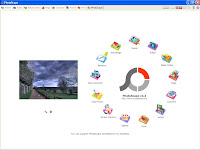 One of my favorite photo editor is PhotoScape. It's a free photo editing program. Yes, it's free and very useful. It's so easy to use cause it has very user-friendly interface. I like this program just because it doesn't take me a lot of time to learn to use it. I just took a few minutes for learning it. If you have ever use photo editing programs, I believe you will like this one for doing simple jobs. But this doesn't mean that it can't do much. It's really rich in features.
When I first ran this program, I thought there would be a lot of things to share and tell in this blog if I write about this little great program. But, I think I will write about this new effect, "Make a box
effect". This is a filter which I have never seen in other photo editing programs.
Well, let me tell you a bit about this filter.
- First, click Editor on the circular interface menu.

- Then you'll be able to see a folder list on the left side and the thumbnails of your image files.
- Click on a file to view it on the editor window.
- Then click Filter and select Make a box, after that select your desired box type.
- And you're done. Just click Save button on the right corner to save the box image.
Funny photo blending effects
Most people like working with photo blending when using photo editing software like PhotoShop. But Photo Blending is also not so easy when you want to get special blending effects, especially those who are still beginners.
For those beginners, they can usually make simple photo blending. Or they can use special features included in a photo editing software like Ulead Photo Express. This is also my favorite. I first knew this program when I installed drivers for Acer scanner about 10 years ago. That time my friend bought an Acer scanner and Photo Express was included in it. It's a very easy to use program cause it comes up with many special effects.
Adobe PhotoShop seems to have been designed to do more than simple photo editing. It's a bit harder to learn when you have no basics at all. But everything is hard at the first start. If you want to get started easier with photo projects (including photo blending), you can also choose PhotoDeluxe which is also a product of Adobe. It's quite nice and easy to use.
But if you just want to have special photo blending effects, you can just go searching for software purposely made for photo blending. You can't find, let me introduce you this one. You'll have a lot of fun with it. Click here to visit the photofunia site!
For those beginners, they can usually make simple photo blending. Or they can use special features included in a photo editing software like Ulead Photo Express. This is also my favorite. I first knew this program when I installed drivers for Acer scanner about 10 years ago. That time my friend bought an Acer scanner and Photo Express was included in it. It's a very easy to use program cause it comes up with many special effects.
Adobe PhotoShop seems to have been designed to do more than simple photo editing. It's a bit harder to learn when you have no basics at all. But everything is hard at the first start. If you want to get started easier with photo projects (including photo blending), you can also choose PhotoDeluxe which is also a product of Adobe. It's quite nice and easy to use.
But if you just want to have special photo blending effects, you can just go searching for software purposely made for photo blending. You can't find, let me introduce you this one. You'll have a lot of fun with it. Click here to visit the photofunia site!

PhotoMeister - great photo freeware
 PhotoMeister is a freeware for that works as a photo editor, photo album and special photo archiver. You can use it to create screen saver, photobook, slide show and even burn to CD as presentation on PC or TV with a VCD/DVD player. Then you can also print your photos, send to e-mail or even publish as a web album. This is really a simple freeware which is complete for many photo works and activities. And the most important is that it's a freeware.
How to adjust the electronics products photos taken with digital camera

 I got the experience of adjusting black electronics products photo when I was taking the photo of "USB cable" with my digital camera which was intended for my previous post. It was taken under fluorescent light. So, you can imagine that the photo was not taken under enough light. I have uploaded the photo before adjustment and after adjustment.
The camera I am using now is BenQ DC 2410. It's not a very good digital camera but at least it can let me take photos for my posting.
If you have ever taken a photo that look like the one you've seen on this page, you can do the following adjustment. Usually a photo with black object and white background will look better with this adjustment. You can use any photo editing software. I usually use the simple yet wonderful tool of Faststone Image Viewer. It's a freeware.
Here are some adjustment you can do:
1. Try changing the brightness, decreasing it when it's too bright.
2. Increase the contrast a little by a little to make the black color looks darker and sharper.
3. Adjusting the saturation to see the vividness of your photo.
Enjoy experimenting!
Free Helicon Filter
 Free Helicon Filter is a freeware that works as photo filter. It doesn't replace a photo-editing software. But it gives you simple tools and filters to let you edit your photos. The filters are easy to use even for beginners because the filters are presented in tabs mode. You will also see instructions about using the filters at the bottom of the window. There are photo thumbnails shown on the right. Another feature of this program is that you can record your voice to comment your photos. Click here to download the free version.
Paint.NET - A powerful photo editing program
 I believe you know Adobe PhotoShop. It's a very famous and complete software for photo editing. But do you know Paint.NET? It's also a photo editing software. But it's free. It's open-source. Now, the latest version is Paint.NET 3.31
If you're looking for a photo editing open-source program with special effects, layers support and an easy-to-use one, you should use Paint.NET.
I recommend this because you can get it for free. You can use it to complete most of your photo-editing works. It can edit most of image files. Click here to download. It's only 1.5 MB, but it's powerful.
Subscribe to:
Comments (Atom)
LinkWithin
