Showing posts with label Youtube. Show all posts

How to clear your Youtube Video Viewing History?

When you have sign up for a Youtube account and you have become a Youtube user, everytime you open a video and watch it even for a second, it's already entered Youtube Video Viewing History. It's like History in  internet browser. You can reopen it on any computer with your user name signing in. You can watch your previously watched video.

But, sometimes you may want to remove Youtube video viewing history. In fact, it's easy to remove or clear the viewing history in Youtube. Here are steps to clear the history.
1. Sign in with your account name and password.
2. Click History link next to your User Profile Photo
3. Click Watch History (in  the middle column of Youtube site)
4. You'll see your viewing history
5. Click the button called "Clear all viewing history"

You can also remove the history one by one, by ticking the video that you want to clear from history and then click Remove.


How to download Tube Mate onto your Android device


Have you ever thought of downloading your favorite Youtube videos using your Android phone or tablet? If you think that it's difficult to download videos from Youtube, you may try using download Tubemate to help you download any videos from Youtube. The following video shows you how to download Tubemate to help you in video downloading task. Happy Youtube downloading!

What's wrong with Youtube?

I was trying to open a video on Youtube about game hacking. When I opened it, the link really directed to Youtube, but guess what happened. It never happened to me since I used Youtube. But, this time, I found an error happening on Youtube upon opening a video for watching. What made me laugh was that the message that appear "a team of highly trained monkeys". See it yourself at the screenshot below.

Youtube embed video code doesn't appear as video on blog post.

I have ever problem showing Youtube video on a blogger post once when I created a new blog. This is called embedding Youtube code. However, embedding code didn't seem to appear on new blog. The thing that puzzled me was that I could use the same method on my older blog to show the post, but it just didn't want to work on my new blog.

I get Youtube video embed code from Share button under the youtube video and then copy and paste the code on my Compose window. I really don't know why it works on my all of my old blogs, but just doesn't work on my newly created blog. I then saw "Edit HTML" tab, next to "Compose". I tried to post the code on "Edit HTML" window and it did work. Really weird, why embedding Youtube video code on new blog should be on the "Edit HTML" but on "Compose" just like the old blog can do. But never mind, at least I know how two methods on how to embed Youtube video codes.

The earliest mouse invention - history of computer mouse

Ever wondered how the earliest mouse was made? It was just a one-button mouse with the shape of a box. This mouse was the ancestor of your current mouse. Want to know more? Watch this video!

Youtube Widget for Blogger and Wordpress

Ever wonder of putting Youtube videos as a widget on your blog? Whether you are using Blogger or Wordpress, there is a widget from widgetbox.com where you can directly put videos according to username in Youtube or according to tag in Youtube. This widget enables you to show more videos than using the widget that provided by Blogger itself which is only 4 widgets at a time. This Youtube widget enables to scroll down to see all the related videos.

* Click here and then fill in the information like Youtube "username" or "tag".
* Then type in the title and then set the color as you like.
* And then you're ready to get your code for this Youtube widget.
* Go to Blogger and add your widget by pasting the code.

With this Youtube widget, you can put videos of your favorite Youtube MTV on your Blogger or Wordpress Blog.

How to use Twitter to promote your business

Twitter has become something very familiar to everybody. You have something in mind, and you would like to share it online. One of the best and simplest way is to use twitter. You can tweet as often as you like. Since it's so popular and so simple to use, many people have been using it to promote their business.

Free Money Management Tools

So, you want FREE PERSONAL FINANCE SOFTWARE? Well, there's a website you can visit to do this. By signing up at this site, you can access its free money management program. It is said to be the best free way to manage your money. How does it work?

The Internet in 1969

I found a video which described the earliest internet, you can call it the pre-conceived version of the internet. It's funny when you see the technology of  internet in 1969.

How to play a video file that contained in a disc image file?

There people who usually do disc copying or we say disc burning job almost everyday. When this has become your common job, and you burn the the same discs repeatedly, you may probably need to copy the disc into disc image file.

Google Tricks, Hacks, and Easter Eggs

Many people know that Google is the largest Search Engine on the internet. Not many of them know that Google has its hidden Easter Eggs, or you can called it Google Search Engine secret or tricks or even you can you that the hack inside Google.

Funny flash video of "animator vs animation"

Feeling bored today? Why not watch something cool and funny that reduce your stress after a whole day work. Well, this is just a animation video entitled "animator vs animation". Sounds funny right. What's happening to them? Ok, forget it and just watch this cool video.

The Comparison and History of Microsoft Internet Explorer

This is a video showing you the comparison of Microsoft Internet Explorer. Since internet was introduced to the world, Internet Explorer has become one of the most popular internet browser of the world. This video shows you its earliest version till the current version.

Traffic Travis - A free SEO tools

SEO has been a very hot topic on the internet. There are many websites that provide free or paid professional SEO tips. The tips are from simple till complex ones. Some even show you how with SEO tips videos.

How to convert Youtube videos into mp3 online and download it easily?

You probably are looking for a way to download Youtube video (perhaps music video) and then wish that the download files are in mp3 format. Actually, this can only be done by conversion. You may use offline software that converts the file immediately after you download. You can also use online converter and downloader. This process of downloading and converting will take a lot of time. Surely you need to wait.

One of the many online web application that you can use to convert video into mp3 and then download it is Snipmp3.com. Through this website you can do the two tasks easier. What you need to do is to paste the link and then wait for the file to be downloaded. That's it. Be patient waiting for it to be downloaded.

How to download Youtube videos easily without installing software?

Youtube has always been the most favorite online video site for every internet surfer. However, sometimes you may need to wait for the buffering which probably takes quite a lot of time. In this situation, you will think of downloading the videos and then watch them offline.

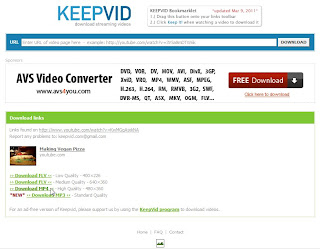
To download a video, you may download it using a program, or using browser plug-in or you may even also use online web service to help you download it. I have ever written posts about downloading Youtube using programs and plugin. This time I'm going to tell you how easy it is to download videos without installing any software.

Here are the steps:
1. Go to www.youtube.com and click the video you want to download.
2. Copy the link of the video, for example: http://www.youtube.com/watch?v=KwMGgAjxkNA
3. Go to www.keepvid.com and paste the video link onto the Download box.
4. Click Download.
5. Click Run if it asks you whether you trust the web application and want to run it or not.
6. Next, you'll have to select the format of video you want to download (flv, mp4 or mp3)
7. Click one of the format and you're done. Wait patiently for it to download.

N.B.
Make sure that you have the latest Java installed on your computer because Keepvid uses Java applet to download the videos. You may also try using Keepvid to download videos from other streaming video sites like Metacafe or Dailymotion

The Making of Youtube

Here's a video I found about the making of Youtube. Just want to share with you.

How to upgrade your laptop memory / RAM - video

Sometimes you don't really have to change your old laptop with a new one. Of course if you have enough budget for a new laptop, it's not a problem as long as money is not a problem. One of the solution for making an old laptop run better or faster is to upgrade it. If you want to upgrade your laptop. You may consider upgrading the RAM or memory first. Upgrading memory can speed up your laptop. But do we need a technician to do this? Or can we do it by ourselves? It's not really a difficult thing. But you need to do it carefully, too. Here's a video from CNET that helps you how to upgrade your laptop memory.

Which video streaming website do you prefer?

Most of us want to watch online movies because it's very convenient. When I was young, I watch videos from video tapes. Then video tapes became outdated and replaced by VCDs, then DVDs. In this digital era, we have online videos, from movies till tutorial videos.


Most people know about Youtube, the most famous videos website, where people share videos. Some upload and some download the videos. After the birth of Youtube in this internet digital era, other websites of video streaming also appear. Some of them even use "tube" as the default name of video streaming websites, like "Teachertube".


LinkWithin

Related Posts Plugin for WordPress, Blogger...