Are you looking for online Chinese dictionary? Let me introduce you a website that provides free Chinese dictionary which gives you very concise meaning and explanation. If you are searching for a complete one which is unlike Google Translate, you will find this one a very great one. You will get a very long explanation of any Chinese characters.
Basically, this online Chinese dictionary will search for you the character you type in the search box. You can also search for any characters which you only know the "pinyin", but don't know clearly the characters. Using this kind of "pinyin search for character" will also help you to learn to know which characters are in accord with which Pinyin.
The online Chinese dictionary also has lots of Lists and Charts to help you understand more about Chinese vocabulary, such as "surname", "word groups", etc. It's such a great one. But since this website is in Chinese interface, you may probably find it difficult if you don't understand at all. You need at least to be able to type in Chinese IME or able to read basic Chinese. This website also reads the character you are searching just like in Google Translate. Now, let's move to the Online Chinese Dictionary.
Showing posts with label Chinese tools. Show all posts
Free Disc Burner in Chinese language
If you are a Chinese Windows user that relies all or most on Chinese language whether typing or just reading, you probably also want this free burning tool in Chinese language. Sometimes, it's hard for someone who knows mostly English to search for Chinese utilities. I was just helping my friend to look for a burning tool of which the interface is in Chinese. Luckily, I found this Free Disc Burner. Let's see the feature of this free program whether it works like Nero Burning Rom, the popular burning tool in the world.
Free Disc Burner is not only free. But also has very simple interface. It doesn't have a copy disc function. But it works more like a burning compilation tools for video, audio and data disc. You can also change the interface language. It comes with many languages including Chinese. That's makes easier for Chinese Windows user to use burn their discs. The language setting can be found at Options. You can also quick erase your Rewritable disc, burn disc image. Click here to download the installer.
How to create a Chinese Character Seal?
Chinese Character Seal is important for a painter or for a poet. They use it as their signature. Since long ago, it has been used when they have finished a paper artwork, such as painting or writing of poetry. The color of this seal is usually red. The seal also a significant of power or status in the past. The Emperors of Ancient China used it for legalized their decree. Even the magistrates of that time used it.
Nowadays, it's mostly used by calligraphers and Chinese painting masters. This kind of seal has become a need for every of them. People used to create the seal by carving out the character one by one with their hands. It's not easy to create it in the past.
But nowadays, it has become easier. In this modern computer world, we can use computer to type in Chinese, that's a very common thing. We can use Windows Chinese Input Method to type the character. We can also make the Windows Input Method easier with the combination of third party software like QQ Pinyin. QQ Pinyin is a freeware. You may visit www.qq.com for more details.
Other software for complete Chinese Input and Output are also available, such as Chinese Star, NJ Star, Twin Bridge and Richwin. Those are quite popular Chinese translator software. But they are not free. You've got to buy.
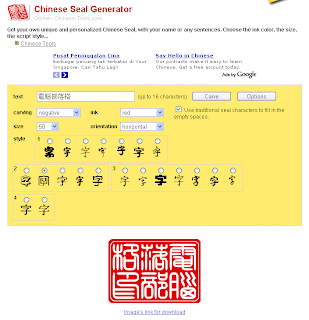
So, when you can type Chinese characters, the next step would be about how to make the Chinese character seal. Actually it's very simple. Just follow these steps:
1. Click this link to Chinese Seal Generator.
2. In the Text text box, type in the characters
3. Then you may choose the type of Carving, Ink Color, Character Size and Orientation of the Character.
4. After that, choose the Style of the Seal.
5. Then click Carve button to create the seal.
6. When the seal is created, you may click the link below the seal to download it.
See, I have created a seal called "Computer Blog Seal" (電腦部落格印). Now it's your turn to create your stylish Chinese Character Seal.
Nowadays, it's mostly used by calligraphers and Chinese painting masters. This kind of seal has become a need for every of them. People used to create the seal by carving out the character one by one with their hands. It's not easy to create it in the past.
But nowadays, it has become easier. In this modern computer world, we can use computer to type in Chinese, that's a very common thing. We can use Windows Chinese Input Method to type the character. We can also make the Windows Input Method easier with the combination of third party software like QQ Pinyin. QQ Pinyin is a freeware. You may visit www.qq.com for more details.
Other software for complete Chinese Input and Output are also available, such as Chinese Star, NJ Star, Twin Bridge and Richwin. Those are quite popular Chinese translator software. But they are not free. You've got to buy.
So, when you can type Chinese characters, the next step would be about how to make the Chinese character seal. Actually it's very simple. Just follow these steps:1. Click this link to Chinese Seal Generator.
2. In the Text text box, type in the characters
3. Then you may choose the type of Carving, Ink Color, Character Size and Orientation of the Character.
4. After that, choose the Style of the Seal.
5. Then click Carve button to create the seal.
6. When the seal is created, you may click the link below the seal to download it.
See, I have created a seal called "Computer Blog Seal" (電腦部落格印). Now it's your turn to create your stylish Chinese Character Seal.
Subscribe to:
Posts (Atom)
